Shadow Claude: A Second Opinion While You Code
Fighting confirmation bias without breaking your flow.

What if you’ve had an LLM agent looking at your chat with Claude Code and calling bullshit on some of your bad decisions or maybe pointing out tradeoffs that you’re not considering?
Wait what?
When you’re deep in a coding session with Claude, you’re in the flow. You’re making decisions, accepting suggestions, moving forward. But sometimes you should step back and ask things like:
- Is this the right approach?
- What am I missing?
- Are there gotchas I should know about?
The thing is, being self aware is hard. Stopping to ask these questions breaks your flow or you can get some decision fattigue and honestly, you just forget to do it.
What I Tried Before
I’ve experimented with some workarounds:
Tmux splits with forked conversations. I’d resume the same Claude session in a second pane and ask meta-questions there. “What do you think about this direction?” “Let’s think out of the box here.” It worked, but:
- You’re stuck with the same bloated context
- You have to remember to actually do it
- It’s just one more thing to manage
Sub-agent patterns. There’s an MCP called Zen that lets your agent spin up other LLMs, send them context, get feedback. Similar idea, but it’s the agent asking, not me getting passive insight.
Neither was quite right.
The Click 💡
Then I saw that Msty Studio just released a feature called Shadow Persona. It’s essentially a side panel where a pre-configured agent reviews your main conversation and gives feedback.
That was the click. This is a real thing people are building. Now I wanted the same, but for claude.
So I did. At just before sleep. In bed. As one does.
Solution: Shadow Persona
A side-cart style agent that passively monitors the primary conversation and gives feedback without disrupting flow.
Version One: Validating the idea
The first prototype was simple:
- Tmux split
- Send a prompt to Claude programmatically via
claude --print - Dump the response into the side pane with
tmux send-keys
No formatting, no syntax highlighting. Just text. But it worked.
Version Two: Actually usable
This is what I built the next morning.
Design Constraints
- Zero friction: No keystrokes required once activated
- Model independence: Shadow LLM can differ from primary (e.g., Claude primary, Gemini shadow)
- Persona specialization: Static system prompts define critique style
- Context limits: Aggressive summarization before transmission
Workflow:
- I’m in a claude-code session
- I type
!shadow - A vertical Tmux split opens
- The split runs Neovim rendering a markdown buffer
- Every three conversation rounds, it triggers automatically
- A separate LLM (configurable) evaluates the conversation using a predefined persona prompt
- The response renders live with full markdown syntax highlighting
The result: I’m working on the left, and on the right I’m getting ongoing commentary.
- “This approach has these trade-offs…”
- “You might want to consider…”
- “Watch out for this edge case…”
A second opinion, automatically delivered, without breaking flow.
The Recipe
- Tmux for pane management
- Neovim for rendering markdown with syntax highlighting on the terminal
- An LLM provider wrapper
- Persona prompts that define what kind of feedback you want
How It Actually Works
Here’s what’s happening under the hood:
┌───────────────────────────────────────────────────────┐
│              Claude Code Session (tmux)               │
│                                                       │
│ UserPrompt ──► trigger.py ──► FIFO ──► loop ──► LLM   │
│                                                  │    │
│ ┌────────────────┬───────────────────────────────▼──┐ │
│ │  Main Pane     │  shadow-claude Pane (nvim)       │ │
│ │                │                                  │ │
│ │  claude code   │  nvim --listen .../observer.sock │ │
│ │                │        │                         │ │
│ │                │  observer.lua (buffer mgmt)      │ │
│ │                │        │                         │ │
│ │                │  render-markdown.nvim            │ │
│ └────────────────┴──────────────────────────────────┘ │
└───────────────────────────────────────────────────────┘
The flow is kinda simple: Claude Code fires a hook when you submit a prompt. That hook triggers a script that writes to a named pipe. Another script runs a loop in the background that reads the pipe, it eventually hits the gateway, and streams the response into a Neovim buffer on the right.
When you end the session, a different hook kicks in and generates a summary.
The Moving Parts
Hooks are how Claude Code lets you intercept events. I use two:
trigger.pyfires on every prompt, counts rounds, decides when to ping the shadowsummary.pyfires on stop, sends the transcript off for a summary
The FIFO pipe is just old-school Unix IPC. The hook writes JSON, the loop reads it. No sockets, no complexity.
The gateway is a thin wrapper around LLM providers (Anthropic, Google, whatever). It handles caching, loads the persona prompt, streams the response back.
The observer buffer is a scratch buffer in Neovim. A small Lua plugin manages it—append new content, clear when needed. render-markdown.nvim makes it look nice.
State I Have to Track
A few things live in ~/.cache/shadow-claude/:
- Counter — how many prompts since last shadow trigger
- Last position — where I left off reading the transcript (so I don’t re-send the whole thing every time)
- Events log — mostly for debugging
- Nvim socket — so the loop can talk to the observer buffer
This works surprisingly well and Nano Banana Pro visualized its architecture like this:
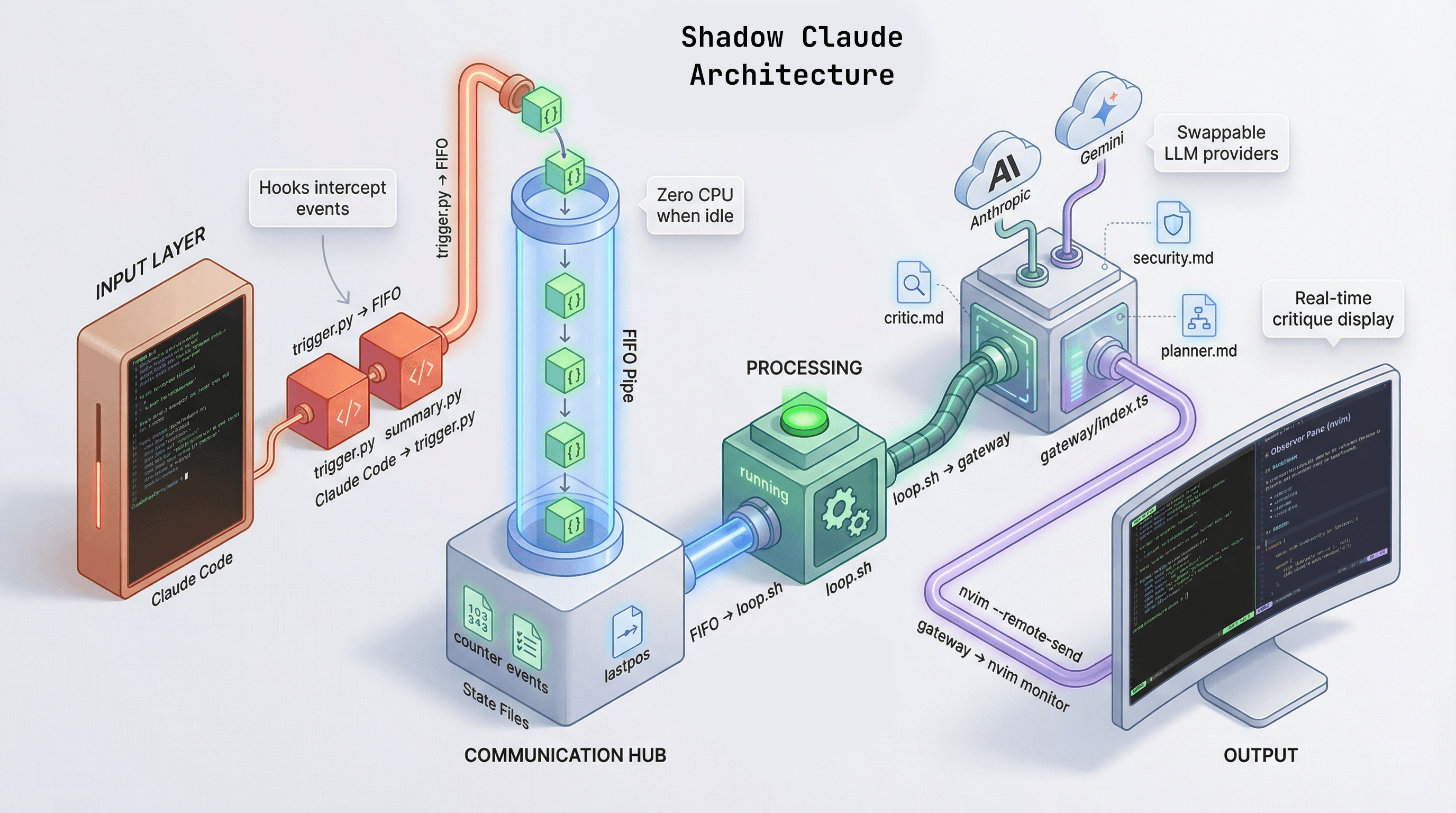
Shadow Claude Architecture
And here’s Shadow Claude giving feedback on its own implementation
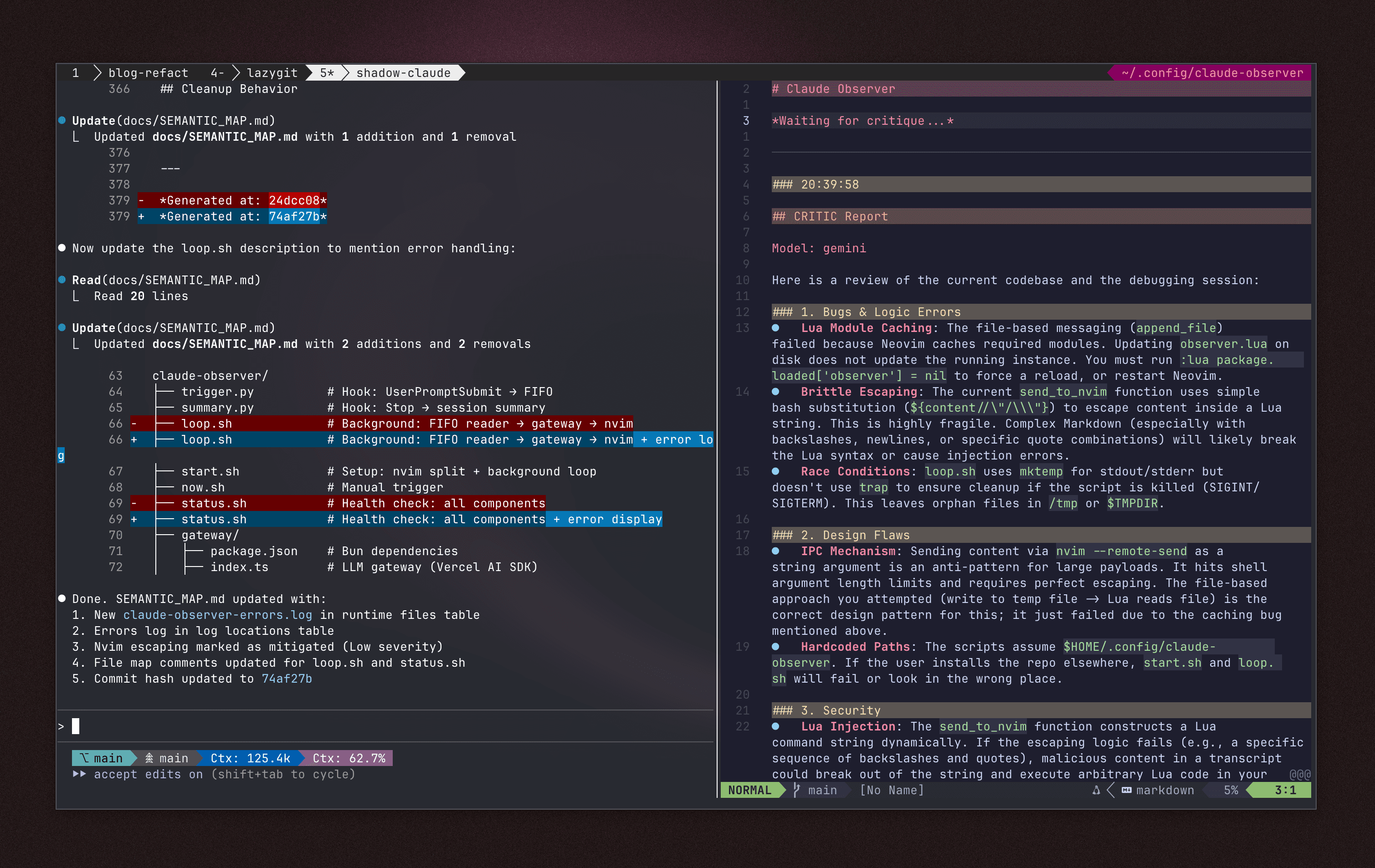
Shadow Claude Demo
As you can see form its comments, this is not quite there yet, but I want to publish this once I’ve get to use it for longer and have refined it a bit more. It’s a fun little side project.